Installment
If the invoice is to be set up on an installment plan, click the  button.
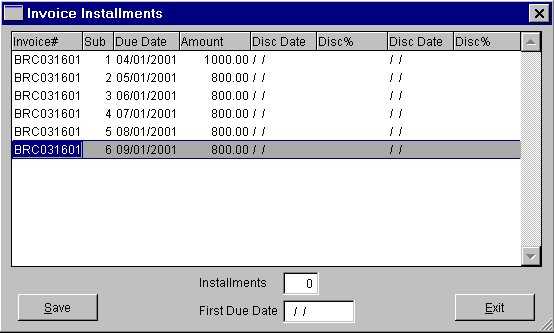
Enter the number of installments in the Installments box and press Tab or Enter.
Enter the date the first installment payment is due in the First Due Date box and press Tab or Enter.
The invoice number entered on the Invoice tab of 'Enter A/P Invoice' will appear as the invoice number on each of the installments. The Sub number will then increment according to the number of installments. The Due Date for each installment will begin with the first due date and increment monthly. The amount in the Expense box on the Invoice tab of 'Enter A/P Invoice' will be divided equally by the number of installments. Any rounding differences will be broken out of the last installment payment.
Changing the Due Date on an Installment
To change the due date on an installment, click in the Due Date box in the row containing the applicable installment and make the change.
Changing the Amount of an Installment
To change the amount of an installment, click in the Amount box in the row containing the applicable installment and make the change. Be certain that the installments total to the invoice amount.
Adding a Discount to an Installment
To add a discount to an installment, RIGHT click in the row containing the applicable installment and select Add Discount from the list box. The following Enter Discounts box will open.
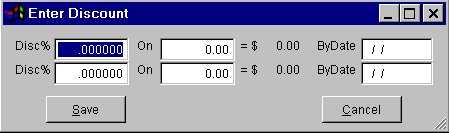
Disc%
The best discount percent offered on the installment, in decimal format.
On
The installment amount the discount may be taken on. This amount may or may not be the amount in the Amount box.
Upon tabbing or entering out of the 'On' field, the discount amount will be calculated according to the discount percent and installment amount.
By Date
The date the installment must be paid in order to receive the discount stated.
Hint: Press the F6 key on your keyboard to select the date from a calendar.
Disc%
The next best discount percent offered on the installment, in decimal format.
On
The installment amount the discount may be taken on. This amount may or may not be the amount in the Amount box.
Upon tabbing or entering out of the 'On' field, the discount amount will be calculated according to the discount percent and installment amount.
By Date
The date the installment must be paid in order to receive the discount stated.
Hint: Press the F6 key on your keyboard to select the date from a calendar.
Click the Save button to save the discount information.
Saving the Installment
Click the Save button to save the installments.




 PDF Downloads